Discover the latest features in Android Auto 14 for UK drivers. From a streamlined interface to improved wireless connectivity and smarter voice control—this upgrade redefines in-car tech for British roads.
Introduction: Not a Revolution, But a Damn Good Upgrade
Let’s be honest. No one was screaming for Android Auto 14. Most of us were too busy shouting at voice commands or fumbling with cables. But here it is—and it’s rather brilliant.
Rather than tossing out everything and starting from scratch, Google has opted for a subtle yet powerful evolution. Android Auto 14 feels like your car finally had a proper sit-down, got its act together, and decided to be genuinely helpful. It’s faster, cleaner, safer, and, dare we say it… actually enjoyable to use?
Whether you’re cruising down the M25 or weaving through city traffic in Manchester, this update is built to make your drive smoother and smarter. Let’s take a ride through everything new.
A Sleeker, Smarter User Interface: Designed With UK Drivers in Mind
Refined Design, Real-World Usability
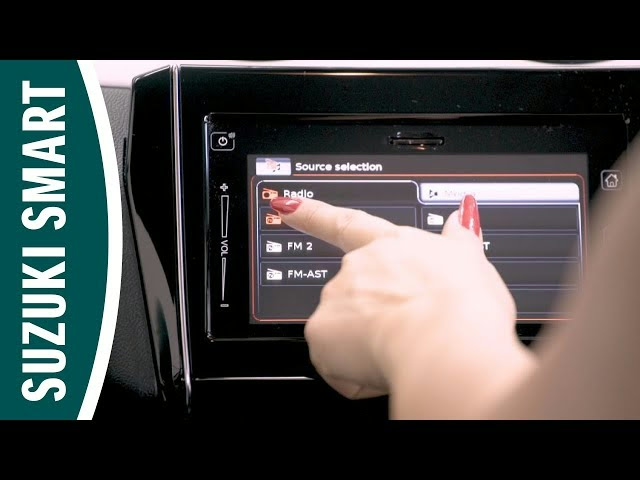
The first thing you’ll notice? A more elegant and intuitive interface. Android Auto 14 swaps clunky icons and awkward transitions for sleek visuals and smooth animations. But it’s not just a pretty face—it’s built for real-world use.
- Larger touch targets: Perfect for glancing and tapping without taking your eyes off the road.
- Adaptive layout: Whether you’ve got a compact screen in a Ford Fiesta or a widescreen in a Range Rover, it adjusts seamlessly.
- Dark mode by default: Because glare on a rainy afternoon drive through Wales? No, thanks.
And yes, animations now flow—no more screen freezes when switching apps. Hallelujah.
Custom Dashboards: Make It Yours (Finally)
Personalisation’s the name of the game. Android Auto 14 lets you shuffle, pin, and remove dashboard elements until they fit you like a glove. It’s the digital equivalent of adjusting your seat and mirrors.
Here’s what you can customise:
- The order of app shortcuts
- Quick access widgets (navigation, weather, podcasts, etc.)
- Notification behaviour (less nagging, more relevance)
In short, your commute just got less irritating.
Let’s face it—nobody in the UK trusts their sat nav 100%. And we’ve all screamed at it for taking us “the scenic route” through three extra roundabouts. Android Auto 14 aims to fix that.
- Real-time traffic updates, more accurate than ever (yes, even in Birmingham).
- Dynamic rerouting that adapts to road closures and congestion without losing its mind.
- Enhanced lane guidance with better visuals, so you don’t miss the junction on the M1 again.
It also integrates beautifully with Google Assistant, allowing you to say:
“Take me to Tesco, but avoid toll roads,”
and actually get what you mean.
Wireless Connectivity: Finally Stable, Finally Reliable
Gone are the days of plugging and unplugging your phone like it’s 2016. Android Auto 14’s wireless mode is here, and it works flawlessly—even in older cars (as long as you have a wireless adapter or a recent head unit).
Benefits for UK drivers:
- Instant connection when you start the engine.
- Reconnection if signal drops during a pit stop.
- No more fiddling with USBs in the rain (we’ve all been there).
And yes, this means fewer cables flying about the dashboard. Clean, simple, and exactly what we needed.
Better Voice Control: Speak Naturally, Get Stuff Done
Here’s where Android Auto 14 really shines. The voice assistant isn’t just faster—it’s smarter. No more robotic commands like “Play music now”. Now you can say:
- “Call Mum on speaker.”
- “Play my Friday morning playlist.”
- “What’s the traffic like on the M6?”
- “Send a WhatsApp to James: ‘Be there in 10.’”
Google Assistant now picks up on context, your habits, and even slang. So go ahead—speak British. It’ll get you.
More Personal, More Predictive: A Driving Experience That Knows You
Google’s machine learning has levelled up. Android Auto 14 pays attention to what you do and when you do it—without being creepy. Over time, your dashboard becomes a reflection of your habits.
You’ll start to notice:
- Suggested apps based on time of day (Spotify in the morning, Audible at night).
- Navigation shortcuts to regular locations (work, school, the pub).
- Automatic reminders like “Fill up soon – nearest Shell station ahead.”
It’s like having a PA in your dashboard—minus the salary.
App Integration: Finally Playing Nice With Others
Android Auto used to be… selective. Some apps worked, others didn’t. That’s over. Android Auto 14 expands compatibility and improves how third-party apps behave.
Now works brilliantly with:
- Messaging: WhatsApp, Telegram, Signal.
- Music & Podcasts: Spotify, BBC Sounds, Amazon Music, Deezer.
- Navigation: Google Maps, Waze, Sygic.
- Audiobooks: Audible, Google Podcasts.
No more tapping endlessly to get your podcast to play. Everything’s where it should be—and it just works.
Entertainment Gets a Boost: Because Drives Shouldn’t Be Boring
Commuting on the A40 or stuck in traffic on the North Circular? At least now your in-car entertainment won’t let you down.
- Faster app load times
- Zero buffering on Wi-Fi or 5G
- Better audio prioritisation (music vs. nav instructions)
Whether it’s your favourite cricket podcast or the newest Stormzy track, Android Auto 14 delivers smooth, uninterrupted playback every time.
Built-In Safety: Designed for Hands-Free, Eyes-Forward Driving
It’s no secret: distracted driving is dangerous. Android Auto 14 includes subtle but effective design choices to help keep your attention where it belongs—on the road.
Key safety features include:
- Simplified interface with fewer taps required
- Voice-first interactions for everything from messages to maps
- Screen-aware dimming to reduce eye strain during night drives
- Do Not Disturb mode that kicks in automatically during long trips
It’s not just smarter. It’s safer. And in UK weather conditions? That matters.
Under the Hood: Performance That Doesn’t Lag Behind
On older versions, switching between apps could feel like trying to drive through molasses. But not anymore.
Performance upgrades:
- Faster boot time (under 10 seconds)
- Smoother transitions between tasks
- Stable performance on most Android phones from the last 3–4 years
- No random crashes when you open two apps at once (finally)
Android Auto 13 vs Android Auto 14: Side-by-Side Comparison
| Feature | Android Auto 13 | Android Auto 14 |
|---|---|---|
| Interface Design | Basic, outdated | Sleek, modern, responsive |
| Voice Command Accuracy | Hit or miss | Highly improved |
| Wireless Connectivity | Often buggy | Fast and stable |
| App Support | Limited | Wide and reliable |
| Navigation Intelligence | Functional | Dynamic, real-time, smart |
| Customisation Options | Few | Deep personalisation available |
| Safety Features | Passive | Actively driver-focused |
FAQs: Android Auto 14 for UK Drivers
Do I need a new car to use Android Auto 14?
Not necessarily. As long as your head unit supports Android Auto and your phone runs Android 11 or higher, you’re good to go.
Is Android Auto 14 available in the UK?
Yes. The rollout is complete in the UK via the Google Play Store. Just update the app.
Can I still use a cable if I want to?
Absolutely. Wired connections are still supported for those who prefer the reliability of USB.
Which smartphones work best with Android Auto 14?
Google Pixel, Samsung Galaxy (S21 and above), and OnePlus phones offer the smoothest experience.
Does it work with Apple Music?
Not yet, but most Android-friendly music platforms like Spotify, YouTube Music, and Amazon Music are fully integrated.
Does Android Auto 14 work on all vehicles?
No, Android Auto 14 doesn’t work on all vehicles. It requires a head unit or infotainment system that supports Android Auto, either natively or via aftermarket installation. In the UK, most vehicles from 2017 onwards support it, especially mainstream models from Ford, Volkswagen, Peugeot, Toyota, Kia, and Hyundai.
To check compatibility:
- Look for the Android Auto logo in your infotainment menu
- Check your car’s owner’s manual or manufacturer website
- Use Google’s compatibility checker tool
If your car isn’t compatible, you’ve got options:
- Install a third-party Android Auto head unit (e.g. from Alpine, Kenwood, Sony)
- Use a wireless Android Auto adapter like the Motorola MA1
Price comparison for UK buyers:
| Device | Approx. Price (GBP) |
|---|---|
| Entry-level Android Auto stereo | £180 – £250 |
| Premium Alpine/Kenwood head units | £400 – £700 |
| Motorola MA1 wireless adapter | £90 – £120 |
Keep in mind that even with a compatible head unit, your phone must also meet minimum system requirements. So no, Android Auto 14 doesn’t work everywhere out of the box—but most UK drivers can upgrade with a little planning.
What’s the difference between Android Auto and Android Automotive OS?
This is a common source of confusion. Android Auto is a projection system—it runs on your smartphone and displays the interface on your car’s screen. Android Automotive OS, on the other hand, is a fully integrated operating system built into the car itself.
Key differences:
| Feature | Android Auto | Android Automotive OS |
|---|---|---|
| Runs on | Your smartphone | The car’s infotainment system |
| Requires a phone? | Yes | No |
| Software updates | Via Google Play | From the car manufacturer |
| Internet connection | Through your phone | Built-in SIM or Wi-Fi |
| Available in UK? | Widely available | Limited (Volvo, Polestar) |
Pros of Android Auto:
- Works on most modern cars
- Easy to update
- Tied to your personal phone data and apps
Pros of Android Automotive OS:
- Deeper integration (climate control, settings)
- Doesn’t require a phone
- Often better for electric vehicles
If you’ve got a newer Volvo or Polestar in the UK, you might already be using Android Automotive. But for the majority of UK drivers, Android Auto is still the go-to.
How do I manually update to Android Auto 14 in the UK?
Android Auto updates typically happen through the Google Play Store on your phone. But if the update hasn’t rolled out to you yet, there are a few workarounds for UK users.
Standard update method:
- Open the Play Store
- Search for “Android Auto”
- Tap Update if it’s available
- Restart your phone before reconnecting to your car
If the update isn’t showing:
- Clear Google Play Store’s cache (Settings > Apps > Play Store > Storage > Clear cache)
- Enrol in the beta testing programme (space permitting)
- Download the APK directly from a trusted source like APKMirror
Important notes:
- Only install APKs that match your phone’s architecture (e.g. arm64-v8a)
- Manual installation is safe if the source is reliable
- Always back up your data before sideloading apps
UK-specific tip:
Rollouts often hit the US first. If you’re in the UK and Android Auto 14 hasn’t shown up yet, patience or APK sideloading are your best bets.
Does Android Auto 14 drain your phone battery more than older versions?
Yes, in some scenarios, Android Auto 14 can be more demanding on your battery than older versions, especially if you’re using it wirelessly.
Battery drain depends on:
- Whether you’re using wireless or wired connection
- Apps running simultaneously (Maps, Spotify, etc.)
- Display settings and screen-on time
Average hourly battery usage (approx.):
| Setup | Battery Drain (per hour) |
|---|---|
| Wired connection | 2–4% (plus charging) |
| Wireless + full app use | 10–15% |
| Wireless + power-saving mode | 6–8% |
Ways to reduce battery consumption:
- Use a fast USB-C car charger (18W+)
- Lower screen brightness on your phone
- Disable background apps before connecting
In summary, yes, Android Auto 14 can use more power—but a reliable charger and proper app management go a long way toward mitigating it.
Can Android Auto 14 be used without mobile data?
Yes, Android Auto 14 can run without mobile data, but functionality becomes limited. It’s still usable for basic tasks, but many features rely on internet access.
Works without data:
- Google Maps (offline maps must be downloaded beforehand)
- Playing locally stored music
- Opening apps already cached
- Voice commands that don’t require a server connection
Doesn’t work offline:
- Live traffic updates
- Streaming services like Spotify or YouTube Music
- Receiving and sending messages
- Cloud-synced reminders and calendar entries
How to prepare for offline use:
- Download maps for your region in Google Maps
- Preload playlists or albums from streaming apps
- Ensure Bluetooth is enabled for calls/SMS
If you’re heading into the Lake District or a signal-free zone, it’s a good idea to prep your Android Auto setup before hitting the road.
Which UK phones are compatible with Android Auto 14 wireless?
Wireless Android Auto requires certain hardware capabilities—meaning not every Android phone can use it, even if it’s up to date.
Minimum requirements:
- Android 11 or higher
- 5GHz Wi-Fi band support
- Stable Bluetooth connection
UK-compatible models (popular):
- Google Pixel 3 and newer
- Samsung Galaxy S10 series and newer
- OnePlus 8, 9, 10, 11
- Xiaomi Mi 11, 12, 13
- OPPO Find X3/X5/X6 series
Not typically compatible:
- Budget handsets under £200
- Android Go edition phones
- Older Huawei devices without Google services
Pro tip:
Some older models can support wireless Android Auto using custom settings or third-party dongles, but stability isn’t guaranteed.
Is Android Auto 14 available on aftermarket infotainment systems?
Absolutely. In fact, Android Auto 14 works very well on a wide range of aftermarket head units, which is ideal if your car didn’t come with built-in support.
Popular brands in the UK:
- Pioneer
- Sony
- Alpine
- Kenwood
- JVC
Price range for UK buyers:
| Model Type | Approx. Price (GBP) |
|---|---|
| Entry-level (7″ screen) | £180 – £250 |
| Mid-range (Bluetooth + GPS) | £300 – £500 |
| Premium (wireless AA + CarPlay) | £600 – £800 |
Make sure the unit supports Android Auto wirelessly, if that’s your priority. Many older models still require a USB connection.
Can you use Android Auto 14 with dual-SIM phones?
Yes, Android Auto 14 supports dual-SIM phones, but there are some limitations.
What works:
- You can choose which SIM handles calls and mobile data
- SMS/messaging apps generally default to the primary SIM
What may cause issues:
- WhatsApp and Signal may not properly distinguish between SIMs
- Some networks can create instability if dual-SIM profiles clash (e.g. Vodafone + Three)
Best practices:
- Set your preferred SIM in Android settings before connecting
- Disable one SIM temporarily if you’re experiencing dropouts
Most UK dual-SIM phones (Pixel, Samsung, OnePlus) handle Android Auto 14 well—but if you use two active numbers regularly, test both before long trips.
Why does Android Auto 14 keep disconnecting randomly?
Random disconnections are a common complaint—but often the issue is with the phone or the cable, not the system itself.
Top causes of disconnects:
- Faulty or low-quality USB cables
- Outdated Android Auto app
- Wi-Fi interference in wireless mode
- Power-saving settings disabling background apps
Fixes to try:
- Use a high-quality USB-C cable (preferably under 1m)
- Keep the phone fully unlocked before connecting
- Disable battery optimisations for Android Auto
- Use a 5GHz hotspot for wireless mode
If you’re wireless:
Make sure both your car and phone are connected to the same Wi-Fi band and avoid public Wi-Fi networks.
Can Android Auto 14 be used with older Android versions?
Unfortunately, Android Auto 14 requires Android 11 or newer. If you’re still running Android 10 or below, you won’t get the latest version—and some features may no longer work properly.
What you can still use (older versions):
- Basic navigation
- Music playback via USB
- Hands-free calling
What you’ll miss:
- Personalised dashboards
- Enhanced voice commands
- Wireless connection
- Smart notifications
Suggested upgrades:
| Android Version | Status with Auto 14 | Recommended Action |
|---|---|---|
| Android 12–14 | Fully compatible | No action needed |
| Android 10 | Limited support | Update if possible |
| Android 9 or below | Unsupported | Consider a new device |
Upgrading your phone is the simplest way to unlock the full Android Auto 14 experience—especially as UK networks continue phasing out older tech.
Conclusion: Android Auto 14 Is the In-Car Upgrade UK Drivers Deserve
If you’ve ever yelled at your dashboard, fumbled with USB cables, or felt personally victimised by voice commands—Android Auto 14 is your redemption arc. It’s not flashy for the sake of it. It’s functional, fluid, and finally fine-tuned for real British roads and routines.
From smarter navigation and wireless bliss to personalised interfaces and voice commands that actually work, this update is less about bells and whistles and more about doing what matters better.
So if you haven’t updated yet? What are you waiting for—rush hour on the M25?